If you’re like several of my clients, your author website and your Substack may be your most important marketing tools.
So it makes sense that you want them to work together, both functionally, and visually. A reader should be able to land on either, and immediately know that they are connected versions of you.
And although they are different tools, it’s not that hard to make them look visually cohesive. After all, if you’ve invested in professional website design, you don’t want your Substack to simply look like everyone else’s.
The good news is that Substack has become considerably more customizable over the last year. It still isn't as adaptable as most website tools, but there's enough control to create a coherent experience.
Below, I’ll give my favorite tips in priority order. I’ll reference Squarespace where relevant — since that’s the website tool I specialize in — but you can likely apply this advice regardless of where your website is built and hosted.
Top 5 ways to help your Substack match your author website
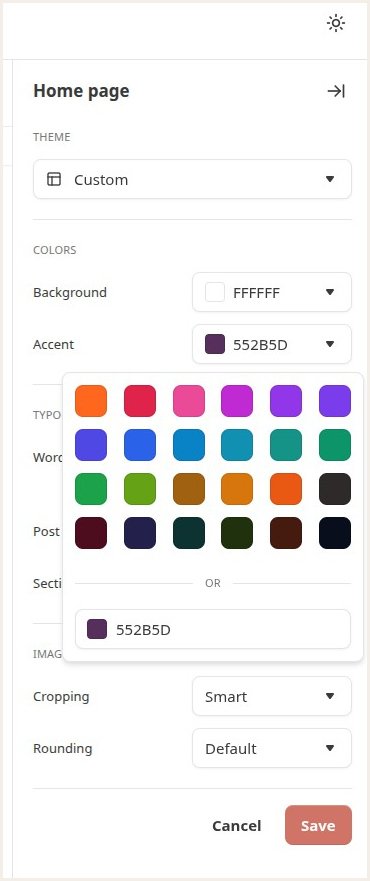
My best and favorite tip: change your Substack accent color.
Visit your Substack Website Editor to do this. The link will be:
https://your.substack.com/publish/website-editor/homeSee below for how to find the exact colors in use on your author website.
This allows your Substack sign up form, when embedded in your website, to match beautifully.
While you’re there, pick a font for your Substack titles that’s broadly similar to your website typeface. But there isn’t a tonne of choice, so don’t obsess over matching exactly - just go for the same vibe (for example, a simple “sans serif” versus a more traditional “serif” font).
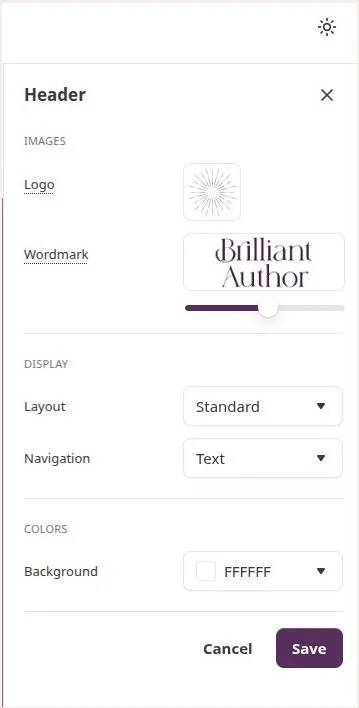
Still in the Substack Website Editor, go to the Header section and add a logo that’s the same as, or recognizably consistent with your website. You can have a wordmark logo too, but don’t stress about that if you don’t already have a branded image.
Use the same author headshot and same short bio. This reassures readers they’re in the right place, looking at content from the same person.
The link to edit these is: https://substack.com/profile/edit
Edit your Substack Welcome email. Substack has separate welcome emails for free subscribers, paid subscribers, and so on.
Do this from your Substack Settings page.
And here’s the Substack guide to editing your welcome email.
Remember you can refer people to your website for exclusive content, reader bonuses, a comprehensive overview of your books, and more. Even if you put a lot of effort into your Substack, your website is online real estate that you own.
If you can find your way to the Substack Website Editor, you can make a big impact in just a few minutes!
Here’s more information from Substack on using their editor to level up your visual impact.
For bonus points (but definitely don’t stress about these):
Create a Welcome Page on Substack
Add an Email Banner so that every newsletter has a branded header image
How to find your exact website colors in Squarespace
Because I specialize in Squarespace websites, here are my tips for finding your Hex color codes. You should be able to hunt down your color codes on other website tools too, or, use my second option below.
Option 1:
While logged into Squarespace, click the paintbrush icon in the top right corner of your screen
Click on the arrow to the right of Colors
Then click Edit Palette
From the 5 colors shown, click the one you want to use as your Substack accent color. Typically, you want your brightest, most eye-catching color, and if I've designed your Squarespace website, this will usually be the middle one.
Below, Squarespace will show the color code in one of 3 ways: Hex, RGB, or HSL. Substack wants Hex format, so change to that if necessary.
Copy the 6 numbers and letters that you see there. For example, my dusky purple is 776885 and my teal is 43697C.
Paste that code into Substack, as outlined above.
Option 2:
Another tool I love is the Eyedropper browser extension.
This is a great option to pursue if you’re not on Squarespace (and you don’t know how to dig around in your website tool to find colors), or if you love exploring color in general and would like the ability to grab a color code from any web page.
Conclusion
Your Substack shouldn't look like it belongs to someone else!
Think of your website and Substack as one ecosystem, not two separate brands.
But if you don’t want to do this work yourself, I offer a Squarespace-Substack Power Up package to get your website and Substack not only looking beautiful together, but working in harmony too.
I’ll spend two focused days sorting out how your Squarespace site and Substack talk to each other—so your readers move effortlessly between the two, your sign-ups increase, and your author platform feels polished and intentional.
More resources on Substack for authors
How to Embed a Substack Signup Form in Your Website
How to Embed Your Substack Feed in Your Squarespace Author Website
Substack for Authors: Pros and Cons
Save 10% off your first subscription for a Squarespace website by using the code PAULINE10
This article contains affiliate links. I only recommend products and services that I love, and I may earn a small commission if you purchase through one of my links. But you don’t pay any extra.